The Myth of the One-Stop City Service
A one-stop city service can route questions without owning the decision. Track each handoff, reference number, and next action to keep your request moving.
The most common mistake with a one-stop city service is assuming the first person who answers owns every part of a problem. That can cost you time when a request moves between offices and each expects another to provide the history. Treat the service as an entry point, then track which office owns each next action.
City teams handle different records, rules, and tasks. A service desk may log a missed trash pickup, while a sanitation team checks the route. A building office may answer a permit question, while another department maintains property records. The useful question is not only where to report an issue, but what record the city creates and who acts on it.
What can a one-stop city service do?
A central phone line, online portal, or walk-in counter can receive a request, identify a likely department, and explain how to submit information. It may also provide a reference number or show whether the request has been routed. These functions can help you keep track of a matter, even when the service cannot make the final decision.
Think of the first contact as a dispatcher. It can direct a concern to a team that owns the service, but it may not control that team’s schedule, records, or judgment. Some issues cross boundaries. A blocked sidewalk, for instance, might involve public works, a property owner, or an accessibility office, depending on who maintains the location and what caused the obstruction.
Before you contact the city, identify the task you need done. Are you asking for information, submitting a report, seeking a decision, or checking a request’s status? “Who handles this?” is a routing question. “Has the repair been assigned?” is a status question. A request to apply a rule differently may need a formal review.
How should you make the first contact?
Choose the official channel that fits the task. A city portal may work well for a report that needs a location and photo. A phone line can help if you are unsure which service applies. For a complicated matter, ask whether a staff member or office coordinates referrals.
Keep your first contact focused on the information needed to route and identify the request: its location, the service or record involved, and the outcome you are seeking. If you contacted another office, give its name and any reference number. Ask whether the first office can make the decision or only forward the request, and which team will handle the next action.
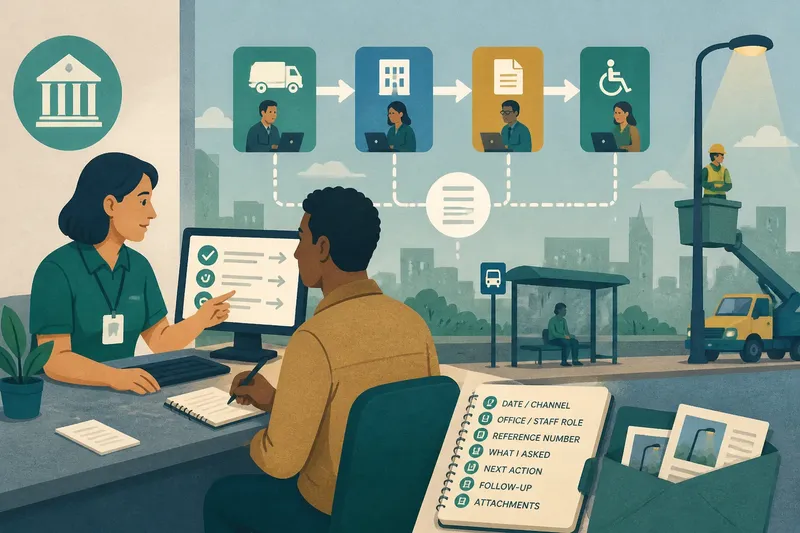
Imagine you report a streetlight out beside a bus stop. The service desk accepts the location and sends the report to a lighting team, but cannot tell whether the city or a transit agency maintains the fixture. You ask which organization will verify ownership and whether the report will stay open while that is checked. The expected result is a clear routing question and a traceable request, even if no repair date is available yet.
What should your contact log track?
Use a notebook, a phone note, or a basic spreadsheet. Keep one entry for each call, portal message, email, or visit. The log should show the chain of records and decisions, not reconstruct a debate.
- Check whether the entry names the channel and date; if either is missing, add it before relying on the note to establish the contact sequence.
- Check whether the office and staff role are identified; if not, record the department or service desk you reached, or ask for that information at the next contact.
- Check whether the reference number is copied exactly; if you have one, use it in follow-ups, and if you do not, ask whether a request was created and how it can be identified.
- Check whether the entry says what you asked the office to do; if it does, keep that wording, and if it does not, add a short description of the requested action.
- Check whether the log distinguishes the office’s stated next action from your own expectation; if the next action is unclear, ask the office who will do what next.
- Check whether related emails, photos, and portal messages are saved with the entry; if they are, retain the connection, and if they are not, save them in the same folder or note.
- Check whether a promised follow-up date or channel is recorded; if one was given, use it, and if none was given, ask when and where to check again.
Keep status language precise. Write “portal displays ‘assigned’” rather than “a crew is coming,” unless the city explicitly said a visit is scheduled. A status label describes what the system shows; it does not necessarily identify the next action.
How do you keep a handoff traceable?
When an office redirects you, carry forward the relevant record instead of starting from the beginning. Give the next office the reference number, the service or record involved, and the action you are seeking. Ask whether it can see the earlier request. If it cannot, ask what information it needs and whether it can connect the new record to the original one.
Keep both reference numbers if a second request is opened. They may identify separate records, even when they concern the same matter. Note how they relate, such as “new department case linked to earlier service request,” but only if the office confirmed that link. Otherwise, mark the relationship as something you asked the office to verify.
If two offices give different answers, record which office provided each answer and what each said it could do. Then ask which office owns the next decision. Avoid sending the same message to every address you can find; a focused question to the responsible office makes the record easier to follow.
Which questions help you choose the next contact?
Can the first office make a decision?
Ask whether it can approve, deny, schedule, or change the service you are asking about. If it only receives or routes requests, ask which office owns that decision.
What does a reference number identify?
It may identify a contact, service request, or formal case, and these records are not always interchangeable. Ask what record the number belongs to, then quote it exactly in later messages.
What if the city says another organization is responsible?
Ask for the organization’s name, the reason for the referral, and its official contact channel. Record whether the city closed its own request or left it open while the other organization reviews the matter.
When should you follow up?
Use any time frame the office gave you and note the channel it recommended. If no time frame was given, ask when a status check would be appropriate and which office should receive it.
How can you follow up without restarting the request?
Start with the reference number and one status question. State the last action the office confirmed, then identify what remains unclear. For example, if you received confirmation that a request was routed but no team was named, ask which team has it and what action is pending.
Say you have a portal request for the streetlight near a bus stop, and the log contains the original reference number plus a message saying it was routed. You check the portal and see no team name, then call the service desk and give the reference number. You ask whether the lighting team or transit agency has the request, and whether the city’s record remains open. If the desk identifies a team, you record its name and the stated next action; if it cannot, you ask which office can verify ownership and note that follow-up contact. The resulting record shows what is known, what remains unresolved, and where to direct the next question.
After a call, send a concise written recap if the next action or ownership is easy to misunderstand. Include the reference number, the question discussed, and the action the office said it would take. If your note does not match the office’s account, ask for a correction. Keep the recap focused on making the service record accurate.
A one-stop city service is most useful when you treat routing and decision-making as separate parts of the process. A clear log of the reference number, responsible office, and next action makes a one-stop city service easier to follow up with—and helps you see whether the city has answered the question you actually asked.